Say where you want to go: ⌘K and table filters with AI ✨
We've rebuilt the command palette, which opens with ⌘K (Ctrl+K on Windows). It now finds every page and setting you can open, remembers what you picked, and offers what you can do on the page you're on. And in Enterprise organizations, it understands plain language.
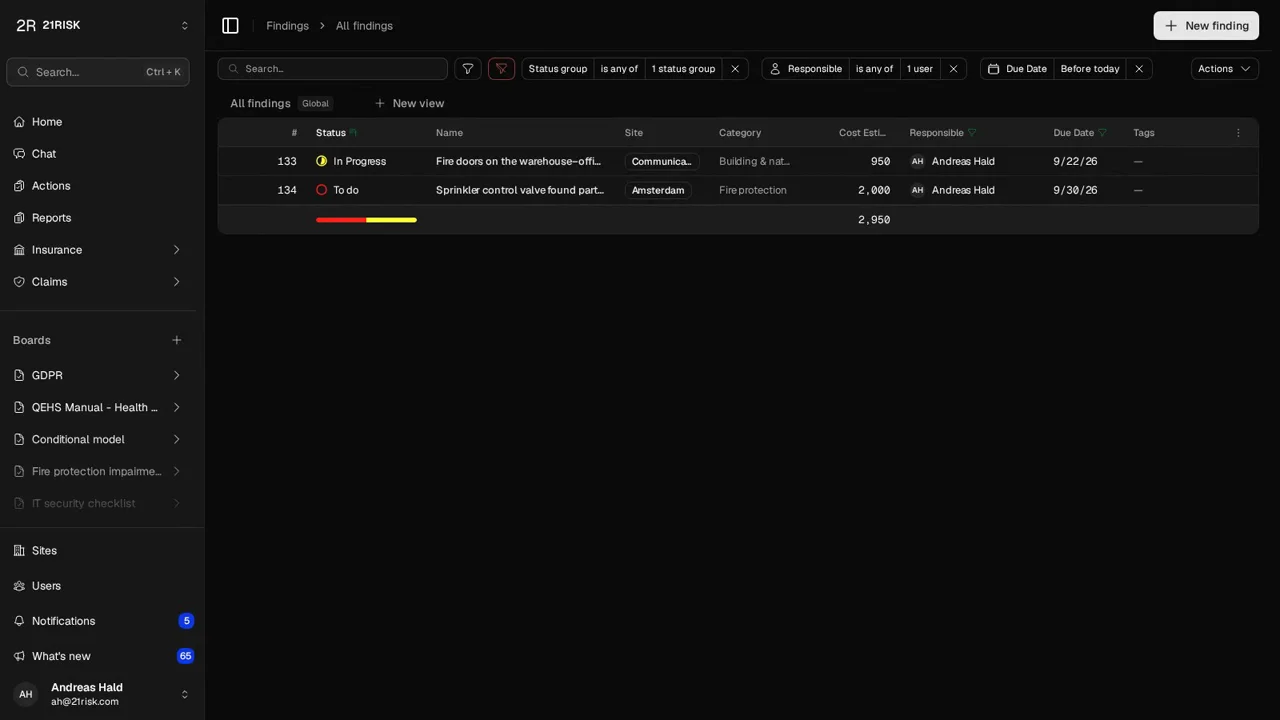
Go there with AI
Type what you want to see, such as “overdue findings assigned to me”, and pick Go there with AI at the bottom of the list. 21RISK opens the Findings table with the filters already set: open, due before today, and assigned to you.
It knows the names of your sites, people, statuses and categories, so “closed actions at Aarhus” or “Jens's open risk improvements” work too. It also finds pages and settings: “where do I change our logo” opens the logo setting.
Filter with AI
The same works in every table's Filter menu. Type “only Amsterdam” and press Enter: the filters you already have stay, and the table narrows to Amsterdam. Describe something new instead, and it starts afresh.
You stay in control
- See what was applied — the filters show as the usual chips, so you can change any of them, or save the table as a view.
- Only what you can see — AI only looks up the sites and people you have access to, and only opens pages you can already open.
Availability
Go there with AI and Filter with AI are available to Enterprise organizations. A request costs a fraction of a cent, and counts toward your organization's monthly AI spend, which includes €50 free each month.
Read more in Command palette and Filter tables with AI.